
Motive, a Memory for Design Teams
Motive, a Memory for Design Teams

Design teams keep everything in five different places. The spec's in Figma, the reasoning's in a Slack thread from March, the code's in Storybook. None of them talk to each other, so people rebuild what already exists and nobody remembers why anything is the way it is. Motive is my go at fixing that. Concept project, not a client brief, but I treated it like one. Try the prototype for yourself from the link to the right on this text.
Design teams keep everything in five different places. The spec's in Figma, the reasoning's in a Slack thread from March, the code's in Storybook. None of them talk to each other, so people rebuild what already exists and nobody remembers why anything is the way it is. Motive is my go at fixing that. Concept project, not a client brief, but I treated it like one. Try the prototype for yourself from the link to the right on this text.


Client
Self-directed
Deliverables
Product strategy and IA Design system and tokens Figma plugin and desktop app Working prototype, built in code
Year
2026
Role
Designer
Client
Self-directed
Deliverables
Product strategy and IA Design system and tokens Figma plugin and desktop app Working prototype, built in code
Year
2026
Role
Designer
Discovery
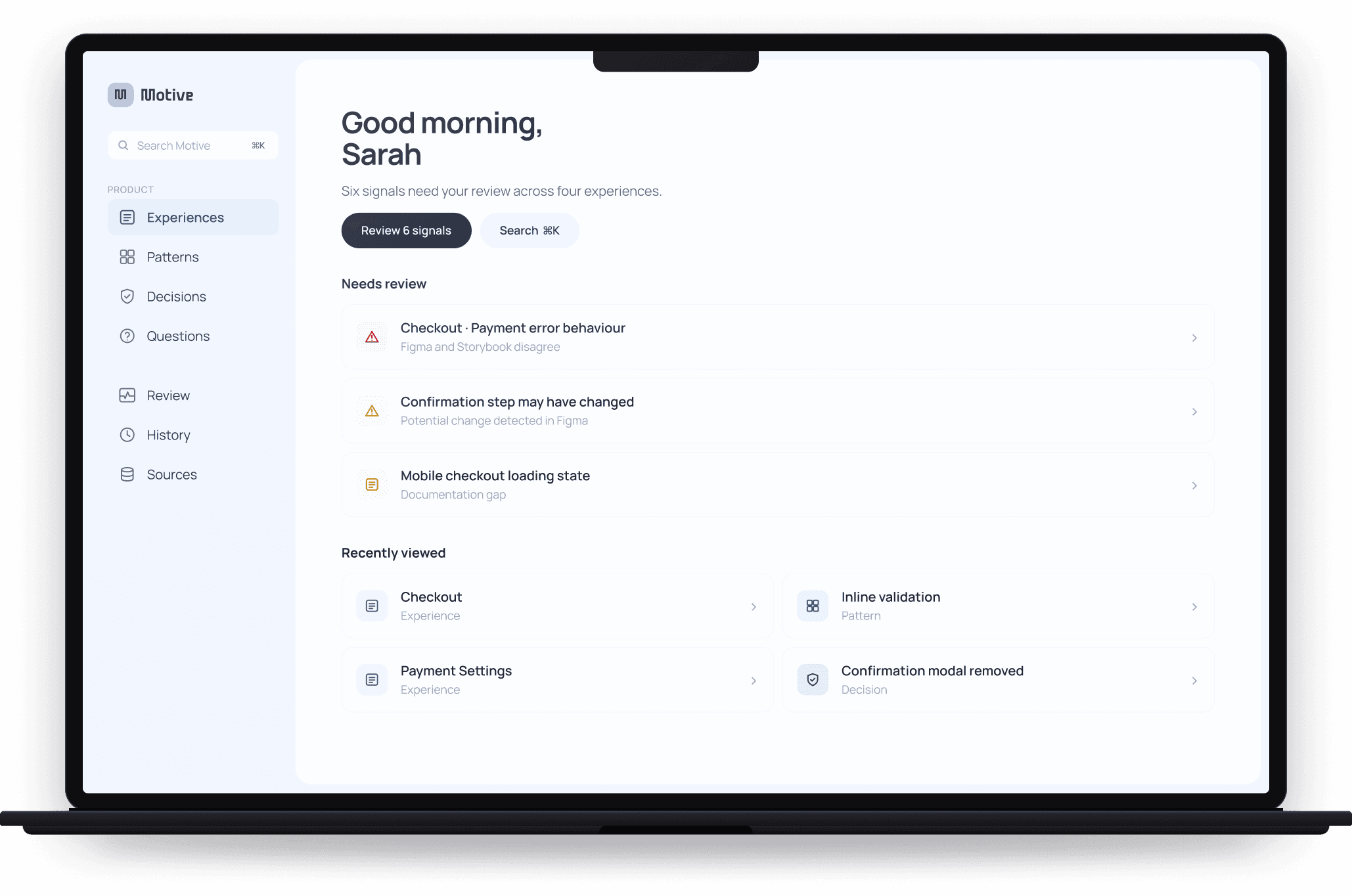
I started with a real situation instead of a persona. Sandy is a product designer, and she wants to change one empty state. Before she can draw anything she needs to know if someone's already made it, why it works the way it does, whether she's allowed to change it, and who needs to know once she has. Nothing she has open can tell her any of that. So I mapped every moment she would hit, one screen at a time, and wrote down what each one had to do before I designed it.
I started with a real situation instead of a persona. Sandy is a product designer, and she wants to change one empty state. Before she can draw anything she needs to know if someone's already made it, why it works the way it does, whether she's allowed to change it, and who needs to know once she has. Nothing she has open can tell her any of that. So I mapped every moment she would hit, one screen at a time, and wrote down what each one had to do before I designed it.

The Problem
Discovery
The documentation isn't missing. It's just scattered, undated, and nobody's checking whether it still agrees with itself. Figma says the button is 40px. Storybook renders 32. Both are confident. The person who could settle it doesn't know there's a question.
I started with a real situation instead of a persona. Sandy is a product designer, and she wants to change one empty state. Before she can draw anything she needs to know if someone's already made it, why it works the way it does, whether she's allowed to change it, and who needs to know once she has. Nothing she has open can tell her any of that. So I mapped every moment she would hit, one screen at a time, and wrote down what each one had to do before I designed it.
UX Strategy
The Problem
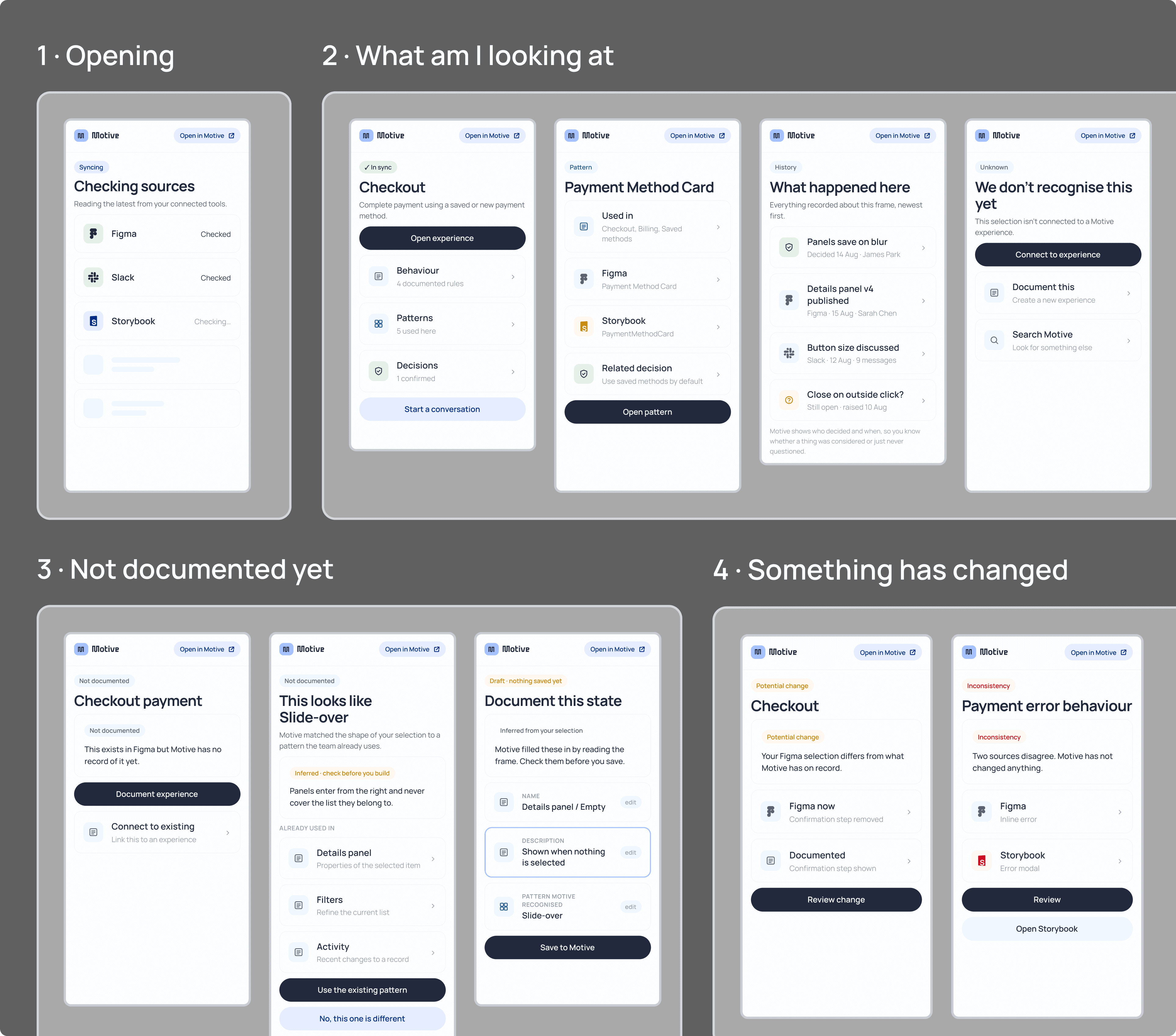
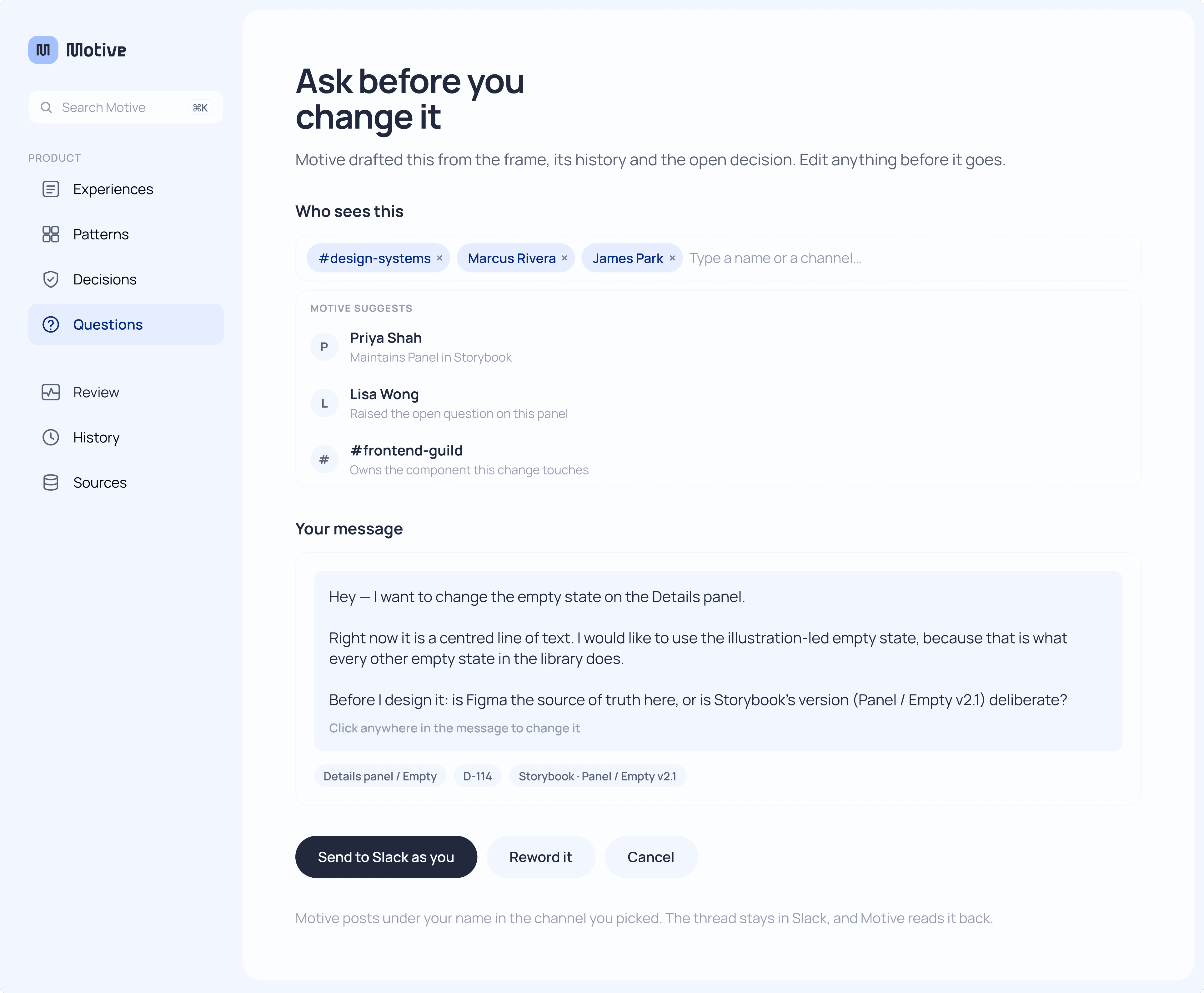
Most of it is a Figma plugin, because that's where the questions actually come up. You select a frame and the panel tells you what it is, what's already been decided about it, and what's still open. So I mapped it as nine moments rather than a list of screens. What am I looking at, not documented yet, something has changed, why it works this way. Each one got its own panel, and a note saying what it had to do before I designed it.
The documentation isn't missing. It's just scattered, undated, and nobody's checking whether it still agrees with itself. Figma says the button is 40px. Storybook renders 32. Both are confident. The person who could settle it doesn't know there's a question.
The Core Flow
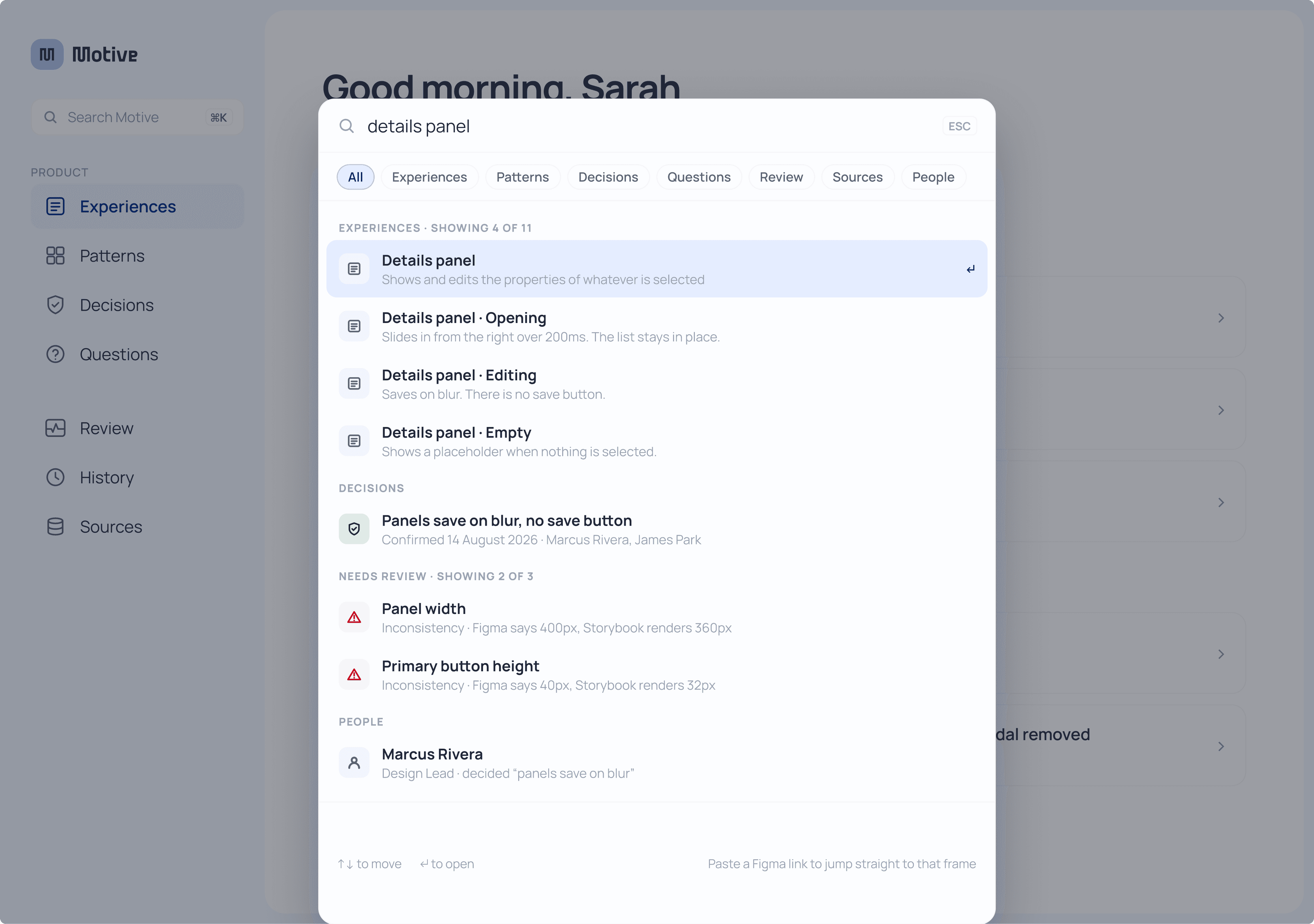
This is the whole point. Want to update the details panel? Search it in Motive first, plugin or desktop, and get every past conversation plus an AI summary of the latest decision. Maybe it's already been tried. Now you'd know. Start a conversation, it carries on in Slack, Motive tracks the outcome. Once you update it, anything that no longer matches gets flagged, so if Storybook drifts from Figma, whoever owns that gets pinged.

The Core Flow
This is the whole point. Want to update the details panel? Search it in Motive first, plugin or desktop, and get every past conversation plus an AI summary of the latest decision. Maybe it's already been tried. Now you'd know. Start a conversation, it carries on in Slack, Motive tracks the outcome. Once you update it, anything that no longer matches gets flagged, so if Storybook drifts from Figma, whoever owns that gets pinged.
Design System
UX Strategy
I kept the whole thing quiet on purpose, mostly white space, a little lift where it matters. The only color doing real work is a calm, confident blue, obvious the second there's something you can click. Past that, color means something. Green means it's settled. Orange means maybe there's an inconsistency. Red means there's definitely one.
Most of it is a Figma plugin, because that's where the questions actually come up. You select a frame and the panel tells you what it is, what's already been decided about it, and what's still open. So I mapped it as nine moments rather than a list of screens. What am I looking at, not documented yet, something has changed, why it works this way. Each one got its own panel, and a note saying what it had to do before I designed it.


Most of it is a Figma plugin, because that's where the questions actually come up. You select a frame and the panel tells you what it is, what's already been decided about it, and what's still open. So I mapped it as nine moments rather than a list of screens. What am I looking at, not documented yet, something has changed, why it works this way. Each one got its own panel, and a note saying what it had to do before I designed it.
UX Strategy
I kept the whole thing quiet on purpose, mostly white space, a little lift where it matters. The only color doing real work is a calm, confident blue, obvious the second there's something you can click. Past that, color means something. Green means it's settled. Orange means maybe there's an inconsistency. Red means there's definitely one.
Design System
This is the whole point. Want to update the details panel? Search it in Motive first, plugin or desktop, and get every past conversation plus an AI summary of the latest decision. Maybe it's already been tried. Now you'd know. Start a conversation, it carries on in Slack, Motive tracks the outcome. Once you update it, anything that no longer matches gets flagged, so if Storybook drifts from Figma, whoever owns that gets pinged.
The Core Flow
I designed it in Figma then built it properly in code. Search actually searches. Building it changed what I designed, because hover states and focus order aren't things you can judge in a flat frame. You can view it and use it at the link in the introduction or here: https://aminaluthi.github.io/motive-prototype/
The Prototype
AI did the early heavy lifting: wireframes and the base of the prototype, so I had something real to react to. We planned it together, and everything after that base was mine. Design system, tokens, spacing, states, all by hand. It caught me out once. The prototype looked heavier than the Figma file because it was still running colours I'd exported weeks earlier, and eleven had moved. Exactly what Motive is built to catch. Slightly embarrassing, quite on brand.
AI-Workflow Integration
Best thing I did was delete something. I spent a day designing a handoff flow for the devs before I realised the product already had one. Most of the good calls here were refusals, and that's the bit I'm taking into the next one.
Reflection
The Prototype
Design System
I designed it in Figma then built it properly in code. Search actually searches. Building it changed what I designed, because hover states and focus order aren't things you can judge in a flat frame. You can view it and use it at the link in the introduction or here: https://aminaluthi.github.io/motive-prototype/
I kept the whole thing quiet on purpose, mostly white space, a little lift where it matters. The only color doing real work is a calm, confident blue, obvious the second there's something you can click. Past that, color means something. Green means it's settled. Orange means maybe there's an inconsistency. Red means there's definitely one.
AI-Workflow Integration
The Core Flow
AI did the early heavy lifting: wireframes and the base of the prototype, so I had something real to react to. We planned it together, and everything after that base was mine. Design system, tokens, spacing, states, all by hand. It caught me out once. The prototype looked heavier than the Figma file because it was still running colours I'd exported weeks earlier, and eleven had moved. Exactly what Motive is built to catch. Slightly embarrassing, quite on brand.
This is the whole point. Want to update the details panel? Search it in Motive first, plugin or desktop, and get every past conversation plus an AI summary of the latest decision. Maybe it's already been tried. Now you'd know. Start a conversation, it carries on in Slack, Motive tracks the outcome. Once you update it, anything that no longer matches gets flagged, so if Storybook drifts from Figma, whoever owns that gets pinged.
Reflection
The Prototype
Best thing I did was delete something. I spent a day designing a handoff flow for the devs before I realised the product already had one. Most of the good calls here were refusals, and that's the bit I'm taking into the next one.
I designed it in Figma then built it properly in code. Search actually searches. Building it changed what I designed, because hover states and focus order aren't things you can judge in a flat frame. You can view it and use it at the link in the introduction or here: https://aminaluthi.github.io/motive-prototype/
The documentation isn't missing. It's just scattered, undated, and nobody's checking whether it still agrees with itself. Figma says the button is 40px. Storybook renders 32. Both are confident. The person who could settle it doesn't know there's a question.
The Problem
The Prototype
I designed it in Figma then built it properly in code. Search actually searches. Building it changed what I designed, because hover states and focus order aren't things you can judge in a flat frame. You can view it and use it at the link in the introduction or here: https://aminaluthi.github.io/motive-prototype/
AI-Workflow Integration
AI did the early heavy lifting: wireframes and the base of the prototype, so I had something real to react to. We planned it together, and everything after that base was mine. Design system, tokens, spacing, states, all by hand. It caught me out once. The prototype looked heavier than the Figma file because it was still running colours I'd exported weeks earlier, and eleven had moved. Exactly what Motive is built to catch. Slightly embarrassing, quite on brand.
Reflection
Best thing I did was delete something. I spent a day designing a handoff flow for the devs before I realised the product already had one. Most of the good calls here were refusals, and that's the bit I'm taking into the next one.
Design System
I kept the whole thing quiet on purpose, mostly white space, a little lift where it matters. The only color doing real work is a calm, confident blue, obvious the second there's something you can click. Past that, color means something. Green means it's settled. Orange means maybe there's an inconsistency. Red means there's definitely one.
The Prototype
I designed it in Figma then built it properly in code. Search actually searches. Building it changed what I designed, because hover states and focus order aren't things you can judge in a flat frame. You can view it and use it at the link in the introduction or here: https://aminaluthi.github.io/motive-prototype/